At Wirebox we’ve been trialling n8n to see how far we could push AI-assisted workflows internally. Rather than just testing it on a toy example, we picked something with real teeth: an outreach pipeline that pulls genuine technical data about a prospect and uses it to draft a specific, personalised email, complete with followups. Below is how we built it, node by node, and what we learned along the way.
1. Lead sourcing
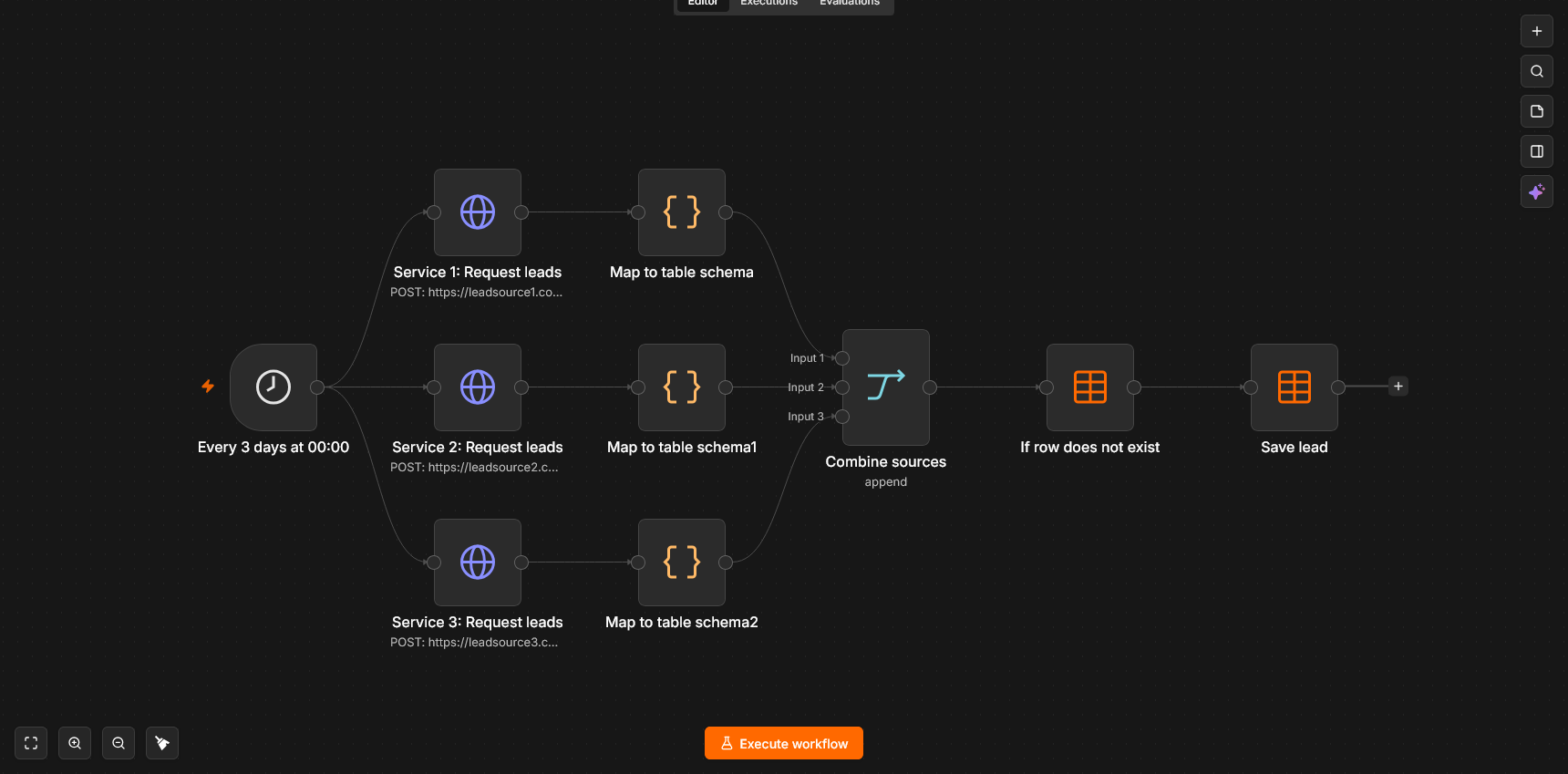
The workflow starts with a scheduled trigger that fires against a handful of lead-source APIs via `HTTP Request` nodes. We’re running a few sources in parallel to maximise volume, so we normalise the output from each into the same form using a `Code` node, and then concatenate results together with a `Merge: append` node. Using multiple sources meant deduplication became the first real problem to solve – a database node checks incoming companies against a `leads` table before anything else runs, so nothing gets processed (or emailed) twice.
Each source has its own filter parameters configured (industry, company size, tech stack signals) so we’re not burning API credits fetching, enriching or emailing companies that were never a fit. Anything that passes gets written to the database with a status of `unactioned`, ready for the next stage.
2. Sending pipeline
This runs as a separate workflow on its own schedule, deliberately decoupled from lead sourcing. That separation makes rate limits easier to manage and means a failure here doesn’t touch the lead data – anything that doesn’t get actioned just stays `unactioned` and gets pushed to the back of the lead queue to be picked back up later.
Finding a decision maker. We enrich the company record via a dedicated contact-finding API, then rank the returned contacts by seniority (CXO, director, “head of” titles score highest) and pick the top match. Where nothing decent comes back, we fall back to a generic address like `partnerships@` or `contact@`.
Verification. Each address goes through an email verification API before it’s used. Hard bounces hurt sender reputation, and reputation damage doesn’t stay contained to just one email – it affects the entire domain. For this reason, we send from a secondary domain rather than our primary one. If the secondary domain ever gets flagged as spam, it doesn’t touch deliverability on Wirebox’s actual domain.
Drafting the email. The prompt to the LLM sets a specific persona, tone and gives context on both Wirebox and the company we’re reaching out to. This includes:
- The lead’s metadata (company, sector, contact name/title)
- Enriched lead context if available
- Cleaned website content, converted to markdown rather than raw HTML, so the model gets structure without burning context on inline styles/scripts and wrappers like navbars
- A web search tool the model can call if it needs more context than the lead source and scraped content provide
- Giving the model real information about the recipient made a noticeable difference to output quality – it’s the difference between a bland, clearly blanket email and a personalised email tailored to the current company’s needs and technologies.
Human approval. Every drafted email sits goes through an approval request (we’re using a Slack node with buttons a form to let us make changes) before it can send. This isn’t optional for us – it’s the quality gate that catches anything the model got wrong about the company before it reaches a real inbox.
Monitoring. Once approved and sent, we’re using Mailtrap to track opens, clicks, bounces and spam complaints, allowing us to tune the filters and the prompt to improve conversion rate. We also keep the email ID of the message and update the database with it so we can match up replies to a specific lead.
3. Followup pipeline and inbox monitoring
Sending the first email is only half the job; managing the replies and timing followups automatically is where the pipeline saves the most manual work.
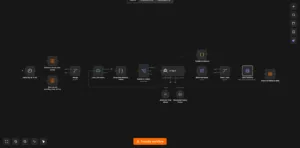
Automated followup scheduling. Every sent lead remains active in the database with a timestamp and a status flag. A separate workflow checks for leads that have been quiet for a small window. If no response has been registered, it triggers a lightweight followup sequence. The LLM receives the original email thread and company info as context to generate a short, natural bump – avoiding generic “just checking in” templates while keeping the tone light and direct.
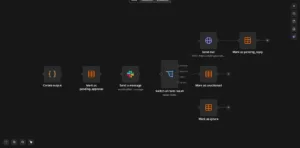
Sentiment classification and reply handling. Incoming replies are routed through an inbound webhook node, using the `In-Reply-To` header to identify the corresponding lead in the database. The email body is then passed to an LLM for sentiment classification, which categorizes responses into distinct buckets
- Interested: Notifies the team on Slack with a summary and escalates the lead for a manual, more nuanced response.
- Not Interested / Unsubscribe: Updates the database record to mark the company as uninterested while leaving it in the database, preventing it from being re-added by the lead sourcing pipeline while also stopping the pipeline, avoiding needless API spend.
- Out of Office / Deferred: Updates the database record to delay any followups for a longer period.
Early takeaways
n8n made it straightforward to keep each stage isolated and error tolerant using its built-in schedule and retry behaviour, which made debugging far easier than we expected going in, especially with their comprehensive execution history UI. The prebuilt nodes allowed for rapid API integration and iteration, possibly faster than writing and tuning code for a task like this. Still early days, but promising enough that we’re continuing to build on it.